
- Free forever
- No data collection
- No account needed
- Everything stays local
- Manifest V3
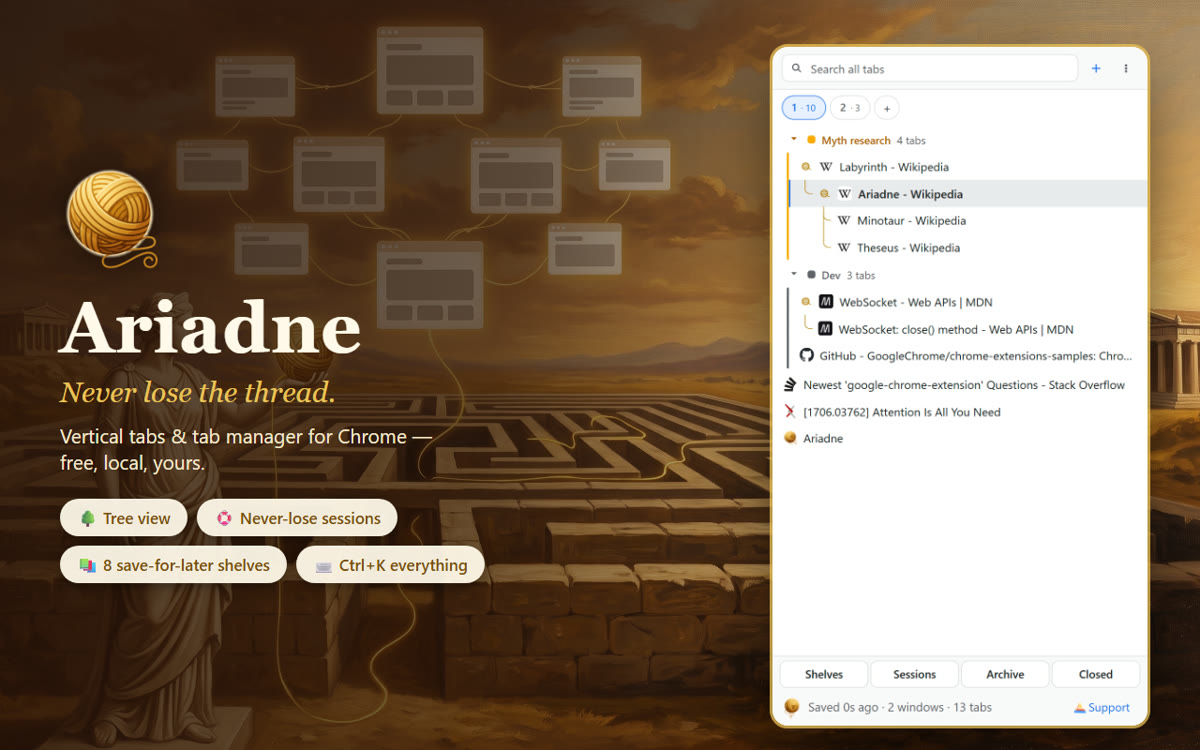
A hundred tabs is a labyrinth. Ariadne is the thread back out: your tabs as a tree in Chrome's side panel, quiet session snapshots so a crash costs nothing, eight save-for-later shelves, and Ctrl+K search across every window. Free. No data collection.
How it works
-
Open the panel
Alt+A, or click the clew in your toolbar. Every tab appears under the tab it was opened from — a tree, not a list, joined by a fine golden thread.
-
Lose nothing
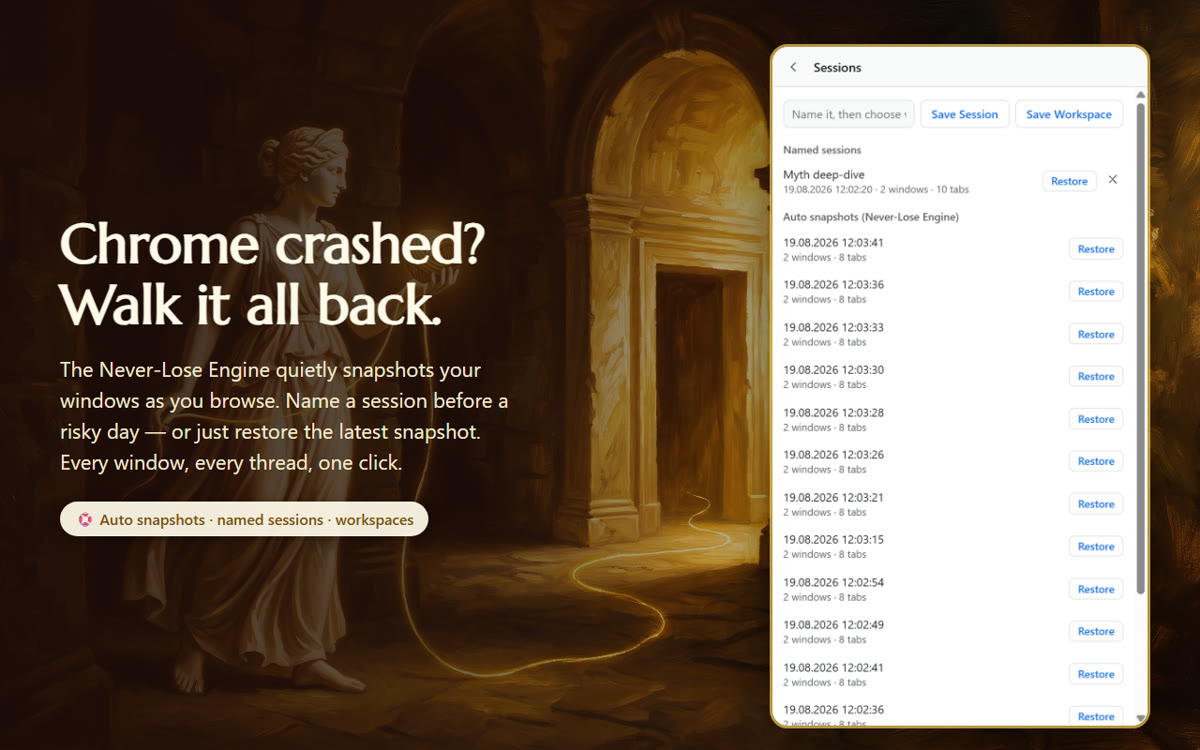
As you browse, Ariadne quietly snapshots your windows. Chrome crashed? Power cut? Open the panel and walk it all back — every window, every thread, one click.
-
Shelve it for later
Drop a tab on Read, Watch, Buy or five other shelves: the tab closes, the intent stays. Ctrl+K finds it again — along with every open tab and recently closed one.
What it does
A tree, not a list
Pages you open from a search stay connected to it. Collapse a branch, close a branch, drag to re-tie.
The golden thread
A fine gold line runs from parent tab to child — the literal thread through the labyrinth, visible the moment the panel opens.
Never-lose sessions
Automatic snapshots while you browse, plus sessions you name on purpose ("Monday research") and workspaces you save deliberately.
Eight shelves
Read, Watch, Buy, Listen, Try, Learn, Plan, Apply. A shelved tab closes; what you meant to do with it stays, searchable.
Search everything
Ctrl+K in the panel, Alt+K from anywhere: fuzzy search across every open window and recently closed tabs, jump with Enter.
Every window at once
The window strip shows all your Chrome windows with live tab counts — move between them, drag tabs across, merge duplicates.
Tab groups, respected
Chrome's own tab groups appear in the tree with their names and colors, and you can group tabs from the panel.
Undo, instantly
Shelved the wrong tab? Closed the wrong branch? Undo brings it straight back — no dialog asked you "are you sure" first.
See it
The tale
When Theseus went down into the Labyrinth, Ariadne gave him a ball of golden thread — the clew — so that however deep the maze wound, he could always walk his way back. A browser with a hundred tabs is a labyrinth of its own. This tool is the thread through it: every tab knows where it came from, every session can be walked back, and nothing once opened is ever truly lost.
The portrait
Permissions, one by one
Ariadne asks only for what tab management genuinely requires. Each permission, and exactly why it exists:
tabs |
The core function — reads tab titles and URLs, and moves, closes and creates tabs to render and manage the tree. |
|---|---|
tabGroups |
Shows Chrome's tab groups with their names and colors, and lets you group tabs from the panel. |
sidePanel |
The extension's main UI is a side panel. |
sessions |
Lists and reopens recently closed tabs, and restores windows after a crash — the never-lose feature. |
storage |
Stores your preferences locally — theme and behavior options. |
favicon |
Shows each tab's site icon from Chrome's own favicon cache. No network requests are made for them. |
alarms |
Schedules the periodic local session snapshots and snooze wake-ups. |
notifications |
Shows a local notification when a snoozed tab returns. Nothing is sent anywhere. |
Nothing is collected or transmitted. Sessions, shelves and the archive live only in your browser's local storage, on your device. Full privacy policy.
Known limitations
- Chrome doesn't let extensions hide the horizontal tab strip — the tree lives alongside it. That's a browser rule, not a bug.
- Sessions, shelves and the archive live in your browser's local storage: uninstalling the extension or clearing extension data clears them too. Nothing is in any cloud — which is the point, but worth knowing.
- Incognito windows are excluded unless you explicitly allow the extension in incognito — Chrome's default, and a sensible one.
Questions
How do I get vertical tabs in Chrome?
Install Ariadne and press Alt+A (or click the clew in your toolbar). Your tabs appear as a tree in Chrome's side panel — every tab nested under the tab it was opened from.
Can it hide Chrome's own tab strip at the top?
No — Chrome doesn't allow extensions to hide the horizontal tab strip. Ariadne gives you a better place to look instead. That's a browser rule, and it's stated here rather than in fine print.
What happens if Chrome crashes?
Ariadne quietly snapshots your windows as you browse. After a crash or power cut, open the panel and restore — every window and its tree come back in one click. You can also name sessions and save workspaces on purpose.
What are the shelves?
Eight save-for-later lists: Read, Watch, Buy, Listen, Try, Learn, Plan, Apply. Drop a tab on one — the tab closes, the intent stays. Undo instantly if you change your mind; search everything later with Ctrl+K.
Where is my data stored? Does it sync?
Everything — sessions, shelves, archive, preferences — lives in your browser's local storage on your device. Nothing syncs to any server, because there is no server. Ariadne makes no network requests at all.
Does Ariadne collect any data?
No. No account, no analytics, no tracking, no third-party services. The privacy policy says so in both English and Turkish.
Is it really free?
Yes, fully — every feature, forever. If it's been useful you can send some wind into the sails on Patreon; it unlocks nothing but gratitude.